
 Eric WagonerandClaude Fable 5
0ed2145f80
Eric WagonerandClaude Fable 5
0ed2145f80
Eric: this shows where games live, but Frosthaven is in the travel
case right now, and sometimes a game is at a friend's house. A home
and a whereabouts are different facts, so a location record can now
carry away: free text for where the box IS when that isn't home.

Set it in the Right now field on any game's detail page ("travel
case", "loaned to Ben"); blank brings it back and leaves no husk of a
record behind. Home is untouched throughout: the opening assignment
stays, the spot stays reserved in the packing math — a loan is not a
move. Contents ride along the same way they ride on shelves: games
stored inside an out box read as out with it, through whole chains.
The home opening's sheet shows an "out:" chip, unshelved rows show it
too, and the exported game page appends "right now: …" beside where
it lives. Away survives locate edits, lane flips, and CSV re-imports.

Verified live, with Eric's actual fact as the test: Frosthaven marked
out to the travel case from its page — its E1 sheet row now reads
"out: travel case · standing, proud", zero page errors.

Co-Authored-By: Claude Fable 5 <noreply@anthropic.com>
Claude-Session: https://claude.ai/code/session_016jXZFSTZQKzAC8fqpWSz9g
19 KiB
The bggpipe user's guide
Everything past the README's quick start: credentials, every stage and its flags, the web app, phones, RPGs, fixing the model's mistakes, and running without a BGG token. Screenshots of everything described here: the tour.
Contents
- Credentials and configuration
- The web app
- From your phone
- The stages, from the terminal
- Taking good shelf photos
- Fixing what the model gets wrong
- RPGs on your shelves
- Uploading safely
- Running before your BGG token arrives
- Keeping your data safe from git
Credentials and configuration
The init wizard is idempotent — re-run it anytime to check status or add keys you skipped. It prompts for the credentials below (hidden input, saved to a .env it creates with owner-only permissions) and offers the one-time Playwright Chromium download. Prefer doing it by hand? Copy .env.example beside your data, fill it in, and run playwright install chromium yourself.
Secrets live in environment variables only, never in config files, code, or logs, and .env is gitignored. Every bggpipe command loads .env from the working directory by itself — real environment variables always win over the file, so direnv users and CI overrides keep working unchanged.
Your credentials never leave your machine except to sign in to boardgamegeek.com itself — the README spells out the full privacy picture. The password exists solely because BGG has no write API: adding games means driving the real website, in a visible browser window, on your computer. The saved browser session (storage_state.json) is credential-adjacent — it stays local and gitignored too.
| Variable | Used by | What it is |
|---|---|---|
ANTHROPIC_API_KEY |
extract | Anthropic API key |
BGG_API_TOKEN |
resolve, diff, enrich | Bearer token from your registered BGG application |
BGG_USERNAME |
diff, upload, enrich | Your BGG username (public, but kept in .env so it lives in one place) |
BGG_PASSWORD |
upload (website login) | Your BGG password |
Non-secret knobs live in config.toml: photos_dir, data_dir, the BGG rate limit, and the vision setup — a [vision.<provider>] block per provider ("anthropic" or any OpenAI-compatible endpoint, including a local Ollama), with vision_provider picking one. Local models read spines noticeably worse than frontier ones — expect a longer proofread pass on the Titles page, not a broken pipeline.
What extraction costs: the vision call is the pipeline's only paid step, and it's small — the author's full collection (65 shelf photos, 136 games) came to under a dollar on the default model (Claude Sonnet). It's also one-time: raw reads are cached per photo, so re-running extract is free, and only new or replaced photos are ever sent again. Everything BGG-side is free (the API token costs nothing).
The web app
bggpipe web # opens http://127.0.0.1:8377/ — the whole app in the browser
Eight pages — Pipeline, Photos, Titles, Review, Queue, Library, Shelves, and Help — all pictured in the tour. Stage runs execute one at a time in the background with live output:

Stage runs execute one at a time; every decision saves immediately; the pages live-follow the data files, so a stage run in another terminal shows up without a refresh. The real upload sits behind a confirmation (and behind a stub-data lock if synthetic test fixtures ever regenerate). The in-app Help page documents every status chip and keyboard shortcut.
From your phone
The app is localhost-only by default. To use it from a phone or tablet on your network — proofreading from the couch, or shooting shelf photos straight into the pipeline — serve it to the LAN instead:
bggpipe web --lan # localhost + your network, behind an access key
Startup prints a pairing link (?k=...) and a QR code: point the phone's camera at the terminal and tap. Pairing is one-time per device — the key persists across restarts (data/.lan_key; delete it to revoke every paired device) and the cookie lasts a year. Save the page to the phone's home screen for the full-screen treatment, piper icon included.
To photograph shelves from the phone: on the Photos page, tap the drop zone and choose "Take Photo." The upload narrates its progress, and camera captures get unique shelf-<timestamp> names so rapid-fire shots never overwrite each other. The key is the only lock — there is no login behind it — so still prefer networks you trust (or use a device VPN like Tailscale against the localhost default instead).
The stages, from the terminal
Every stage is also a command, and the two interfaces share all state:
bggpipe extract              # photos → titles.json (+ retake prompts)
bggpipe resolve              # titles → BGG ids/versions in matches.csv
bggpipe review --web         # review UI only
bggpipe diff                 # compare against your BGG collection
bggpipe upload --dry-run     # ALWAYS inspect this first
bggpipe upload --limit 1     # then one game, then small batches
bggpipe enrich               # full metadata → data/games.json
Each stage skips work it has already done; --force/--refresh flags redo it. Every stage is idempotent and resumable: kill it mid-run, restart, lose nothing. All artifacts are flat CSV/JSON files you can inspect and edit. review without --web runs in the terminal instead.
Taking good shelf photos
Straight-on, one shelf (or part of one) per shot, close enough that spine text is legible to a human. If you can't read it, the model can't either. Overlap between shots is fine: duplicate reads are deduped automatically, with the merge shown (and veto-able) in review. Boxes the model spots but can't identify become retake prompts in unidentified.json and the Photos page's "reshoot" tickets: photograph those boxes up close, drop the new photo in, and run extract again.
Fixing what the model gets wrong
Vision reads aren't perfect, and you know things the photos don't show. The Titles page lets you edit a title (fix a misspelling, add publisher/edition/year/language cues you know offhand), split a line into per-photo copies when one title is actually several boxes, remove lines that aren't games at all, and add a game no photo caught. Every one of these is durable: the decision lands in a small committed store (data/title_edits.json, data/title_splits.json, data/title_removals.json, data/title_additions.json) that is replayed on every rebuild — re-running extract or resolve can never undo your curation. Undo any decision by deleting its record from the store.
Games BGG doesn't have at all can be kept as local library citizens: their detail page in the Library takes hand-written facts (players, playtime, publisher, notes) and a cover photo of your own, stored in data/local_games.json and data/local_art/ — the only source such a game will ever have.
RPGs on your shelves
Tabletop RPGs aren't in BGG's board-game database — they live on RPGGeek, which shares the same underlying API. When a title isn't found as a board game, bggpipe retries as an RPG: matches are identified, enriched (designers, publishers, genres from RPGGeek), and browsable in the library (filter: RPGs), but they stay local only — they're never uploaded, since your BGG collection can't hold them. When the automatic search can't reach the right database (BGG has board games named "Dungeons & Dragons" too), every Review card has explicit search BGG / search RPGGeek buttons.
Uploading safely
upload drives a real logged-in browser session against your real account, so it is deliberately careful:
-
--dry-runlogs what would happen without touching the site — always read it first, then--limit 1, then small batches: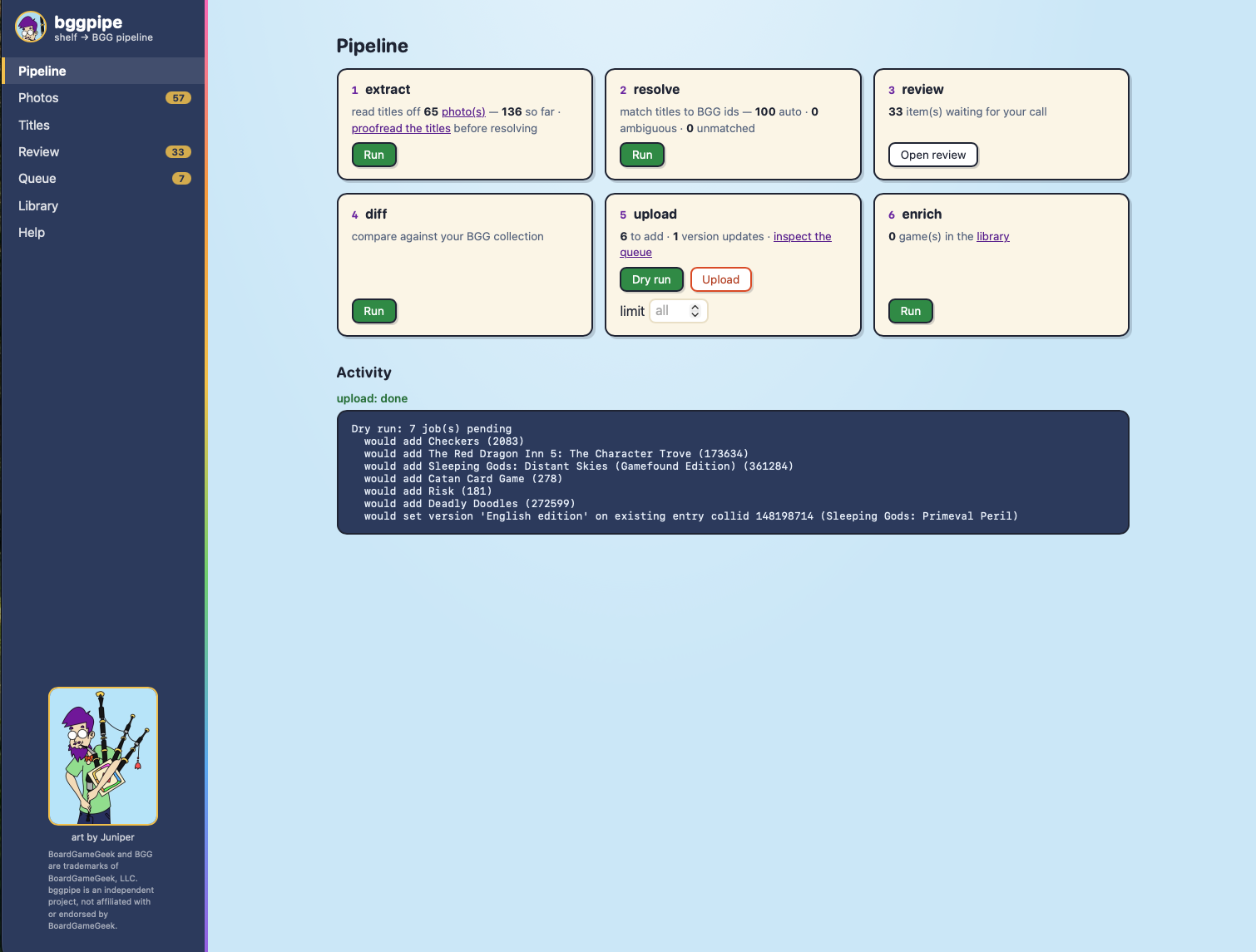
-
The browser runs headed by default — BGG's Cloudflare check blocks headless ones, and a first login may need one human click before the session is saved locally and reused.
-
Requests are slow on purpose (seconds between actions, per BGG's API policy); the Queue page shows exactly what will run before it runs, and
upload_log.csvkeeps a permanent record of every attempt. -
--retry-failedre-attempts failures;--verifyre-fetches your collection and cross-checks the log. Note that BGG's collection export can lag the website by hours — freshly-landed work may look missing todiff/--verifyuntil it catches up. -
Review decisions outrank the queue: re-deciding a match after
diffretires its queued job automatically.

Running before your BGG token arrives
BGG application approval can take a week or more. Until then: extract works immediately (it only needs the vision key), and resolve does what it can, parking the rest as "waiting on BGG API token" — it picks them up automatically once the token exists. Everything is saved as you go.
diff normally fetches your collection live, but there's a logged-in-browser exemption that needs no token: while signed in to BGG, save these two URLs as data/collection_snapshot_base.xml and data/collection_snapshot_expansions.xml (if you get a "queued" message, refresh after a few seconds):
https://boardgamegeek.com/xmlapi2/collection?username=YOU&own=1&version=1https://boardgamegeek.com/xmlapi2/collection?username=YOU&own=1&version=1&subtype=boardgameexpansion
Where everything lives
The Shelves page maps your physical storage and draws it as it really
stands: openings group into rows by their label letters, and each cell's
width is proportional to its interior width, so a Kallax with a double-wide
top row renders as exactly that — a diagram of the wall, not a list. Create
units from presets (IKEA Kallax cube 13.25″ × 13.25″ × 15.4″, Billy shelf,
custom, or a no-size virtual spot like "travel case") as grids of rows ×
columns; add more sections to an existing unit the same way — a later grid
continues the row letters, so 3 × 4 under an A row lands as B1…D4. Duplicate a
unit to stamp out identical furniture — the copy takes the structure
(openings, sizes, zones, descriptions) under a fresh auto-numbered name,
never the games — and rename any unit in place. Openings
are editable (dimensions are all-or-none: three numbers or a no-limit
spot), reorderable within their row (moves clamp at row boundaries so the
diagram can't fragment), and deletable. Both units and openings take a
free-text description alongside the zone keyword — the label is
the address, the zone matches, the description explains. Everything lands
in data/furniture.json + data/locations.json — committed local stores;
your shelf layout is never sent anywhere.
Assigning games: every measured unshelved game shows up to three suggested
openings, ranked by a strict relevance doctrine. An opening already holding
a series-mate or base game ranks first (marked ♥) — kinship is the
pre-colon name stem plus BGG's series field, no taxonomy to maintain, so
every placement you confirm teaches the suggester your organization and
expansions chase their base games automatically. "Fits" always means the
remaining opening — stack budget already spent is subtracted — and
after that, tightest verified fit, so small boxes are offered cubes and
never the oversize row. A measured game with nowhere suitable says
"no matching openings yet"; an unmeasured game gets no suggestions at all,
because can't-verify is not the same as fits. You can also assign by
searching inside an opening, or from a game's detail page (openings
grouped by unit, each labeled fits / doesn't fit / can't verify). Games
stored inside another box inherit their container's spot — through whole
chains (minis in an insert in a big box live where the big box does). On a
phone over --lan, the opening view docks as a bottom sheet — the
moving-day loop is search, tap, done.
When you publish with bggpipe export, the shelves come too: game pages
say where each box lives, containers list their contents, and a shelves
page draws the wall as it physically stands, every opening linking its
residents. Publishing your shelf layout is a choice — --no-shelves
keeps the whole layer out of the export.
Bulk-load a reviewed plan with bggpipe shelve --import plan.csv (columns
name,opening, accepting opening ids or labels) — rejects are reported
(unknown name, ambiguous copies, unknown opening, doesn't fit, lives
inside another box), never guessed. Re-importing is an upsert, not a
reset: rows move their games, games absent from the plan keep their
spots, and hand-entered notes, lane choices, and acknowledgments survive
whenever the opening is unchanged.
The packer is deliberately conservative — one flat pile plus one
standing row per opening — and real shelves are 3-D: boxes sit
crosswise, ride on top of piles, stand proud of a shallow shelf. When
the model refuses a placement you can see with your own eyes, overrule
it: the it's here anyway button in the opening's view (or an
acknowledge column, yes, in the import CSV) confirms the box is
really there. An acknowledged box takes a lane when one works — the
spine-out overhang case lands "standing, proud", skipping only the
depth check — and when even that fails it's marked wedged in:
really there, outside the capacity bars, never warned about. Tap
"here ✓" to retract. Assignment and capacity are separate truths:
a game listed in an opening IS there regardless of what the packer
thinks of the arrangement.
Where a game lives and where it is can differ — the travel case, a friend's house. Every game's detail page has a Right now field: type "travel case" or "loaned to Ben" and the box is marked out everywhere (an "out:" chip in its home opening, on the export's game page too) while its home spot stays reserved — the shelf math doesn't change because a loan isn't a move. Contents ride along: games stored inside an out box read as out with it. Blank the field and it's back; nothing else is touched.
Unmeasured games can't join the capacity math at all — so measure
them. The "unmeasured — measure it" button in the opening's view takes
width × length × depth in inches, saved to data/measurements.json
(committed, like all curation). Your tape measure outranks BGG: hand
measurements overlay whatever enrich found, everywhere sizes are used
(fit checks, suggestions, bggpipe dims, the export). Save with all
three fields empty to clear one.
An acknowledged box takes the standing lane without the depth check —
the width budget stays honest — and stops counting as a warning. Once
acknowledged, later imports needn't re-state it. bggpipe dims reports per-opening capacity, overfull warnings, and
misfits against your real furniture. Capacity uses a two-lane packing
model: each opening holds a flat stack (thinnest axes summing against
interior height, claiming the widest flat box's width) and a standing lane
beside it (boxes on edge against the remaining width) — the largest boxes
lie flat, smaller ones stand, and you can flip any box's lane in the
opening's view. An opening warns only when no packing fits. Unmeasured
boxes are counted and shown, never silently assumed to fit.
Shelf-space planning
Physical box dimensions live on BGG versions, not games, so enrich collects
them in a second cached pass: your exact version's numbers where you chose
one, otherwise a value only when every listed printing agrees (within half an
inch per axis — disagreement is stored as conflicting, never guessed, and
BGG's 0 means "never entered", not zero inches). Then:
bggpipe dims
reports coverage, the ten biggest footprints, and per-opening fit checks against your own furniture (see Where everything lives) — capacity, overfull warnings, boxes that fit in no orientation, and every game whose dimensions can't be verified, because can't-verify is not the same as fits. Trusted dimensions also show on each game's Library detail page.
Publishing your library on your own site
bggpipe export --out ~/my-site/static/library --title "My Game Shelves"
Writes the library as self-contained static pages: an index with search, one
page per game, and a local copy of every cover (public pages must not hotlink
BGG's image CDN). No server, no build step — drop the directory into any
static host, Hugo/Jekyll static/ folder included. Re-runs are idempotent:
already-downloaded covers are kept, failed downloads are retried, and page
URLs stay stable.
What's included follows a privacy rule: cover art, stats, your editions, and your hand-added local games — never your shelf photos (they picture the inside of your home; they stay in the private app).
BGG's API policy asks public-facing apps to display the "Powered by BGG"
badge. The footer carries a text badge automatically; to show the official
logo, save it from your registered application page at
boardgamegeek.com/applications as
data/powered-by-bgg.png and re-export.
Keeping your data safe from git
The README's quick start — installed as a tool, run in a directory of your own — is the only supported way to use bggpipe on your collection. Everything the pipeline produces lives where you run it, and uv tool upgrade bggpipe picks up fixes without going anywhere near your data.
Why not clone and run? The source repo doubles as its author's live pipeline: data/ ships with their real artifacts, committed and updated often. Run inside a clone and your data lands at git-tracked paths — the next git pull will refuse to merge, and the usual remedies (git reset --hard, git checkout ., git stash, git clean -fdx) would destroy your review decisions, hand-written games, upload log, and photos. bggpipe detects this arrangement and warns at init and on the web dashboard; don't ignore it.
One committed file of the author's data deserves a word: data/STUB_DATA.marker is normally absent. It appears only if the synthetic stub fixtures (from scripts/write_stub_fixtures.py) regenerate the CSVs, and the upload stage refuses to run while it exists — so placeholder data can never reach a real BGG account.